
Passport, inside your AI assistants

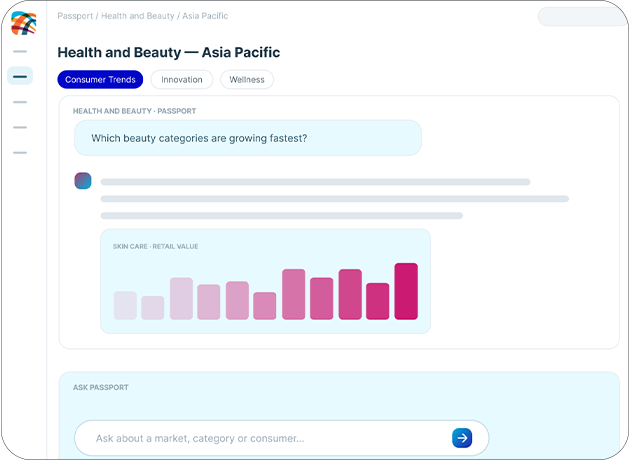
The Passport MCP connector gives AI assistants an interactive line into Passport. Ask a market question in plain language and get a cited answer from expert-verified research.

Request a Passport demo

Passport Mcp V6


How it works

One connector, every assistant

The Model Context Protocol (MCP) is an open standard for connecting AI assistants to a source of data. The Passport MCP connector is Euromonitor’s implementation: once your administrator adds the MCP URL, an assistant can look things up in Passport while it answers and cites what it’s found. 

Works in any AI assistant, including Microsoft Copilot and Claude, as well as Microsoft 365 apps through our federated connector with Microsoft. 

Request a demo

How it fits together

Your assistant, one access layer, our data

Where your teams work

AI assistants | In-house agents | Microsoft 365 apps

Passport Connect access layer

MCP for AI assistants and agents: live, cited answers in the tools your teams already use.

One control layer

Access and entitlements limited to what you licence | Usage visible and reportable

Euromonitor intelligence core

Market sizes · Forecasts · Company and brand shares · Voice of the Consumer · Pricing and menu data.

How it helps you

From question to cited answer

Step 1: Add the MCP URL once

Your IT or AI platform administrator connects Passport to your assistant in one step and controls who can use it. No build, no developers. 

Step 2: Ask in plain language 

In Copilot, Claude or Excel, the way you’d ask a colleague. A market size, forecast or share comes back in under a minute, with the Passport source, edition and data references named. 

Step 3: Add your own data

Follow up in the same conversation—compare markets, change the time frame, or set your own performance against the Passport benchmark. One connected answer, source named. 

Size the ready-to-drink cocktails market in Mexico and tell me who leads it.
Which of our top five markets has the strongest forecast growth in pet care to 2030?
Compare private label share in grocery across Germany, France and Poland.
What are the forecast drivers for colour cosmetics in Italy?
Build me a one-page category brief on functional beverages in Southeast Asia.
How does our Brazil skincare growth compare with the market?

How it fits together

The intelligence you trust, wherever you need it

01

Grounding

AI answers draw on globally comparable, expert-verified market data and cite Passport – trusted evidence in place of unsupported model outputs.

02

Speed

Cited market intelligence in under a minute, in the assistant you already have open – no export, no request to the insights inbox.

03

Flexibility

Model- and stack-agnostic: works with Microsoft Copilot, Claude or any assistant you choose.

04

Governance

Entitlement-based, auditable access with clear AI usage rights and no Euromonitor content stored outside our systems.

Governance

One control layer, whichever route

Entitlements applied at source – every request is checked against the user’s Passport entitlements 

Entitlements applied at source

Every request is checked against the user’s Passport entitlements.

Users only see what you license

Across the platform, API and MCP.

Usage you can audit

Activity is visible and reportable to your administrators.

Clear AI usage rights

Set out in your licence agreement, with no Euromonitor content indexed or stored outside our systems.

FAQs

Your questions, answered

Still have questions or want to learn more? Speak to our team. 

Request a demo

Passport Connect is an optional addition to a Passport subscription. One Connect licence opens access to both the API and MCP routes, serving the content you already licence. 

The MCP connector works in Microsoft Copilot, Claude and Excel today, and with in-house agents built on MCP. The Passport AI agent is available in the Microsoft 365 Agent Store. A federated Copilot connector is in development for H2 2026. 

The Passport intelligence core in your subscription: market sizes, forecasts, company and brand shares, Voice of the Consumer, and pricing and menu data. The Stats API covers the statistics; the Insights API covers report content and analysis. 

Passport data remains in our systems. No content is indexed or stored outside them, the connection is read-only, and your queries aren’t used to train Euromonitor or third-party models.

For the API, yes, it’s a documented, versioned HTTP API and most data teams are productive within a day. For MCP, no: an administrator adds the MCP URL once and teams use it through their assistant. 

Answers are grounded in Passport and cite their source, which is what makes them checkable. Read what comes back as you would any analyst’s answer, particularly where a question has been paraphrased. 

Yes. Your administrator controls which users and groups can use the connection and can remove it at any time. 

A paste is a snapshot with no provenance and no entitlement check. This is a live, governed lookup that cites its source and appears in your usage logs. 

Authentication details are issued within 48 hours of a request being logged. Pre-sales technical support is available while you scope, and the Euromonitor Digital team supports you after go-live. 

Let’s connect Passport to your assistant

Tell us which assistant your teams use and we’ll confirm what your subscription covers, walk your administrator through adding the connector, and share the security documentation your team needs. 

  • A demo of Passport in your assistant
  • Technical and security documentation on request
  • Credentials within 48 hours of approval